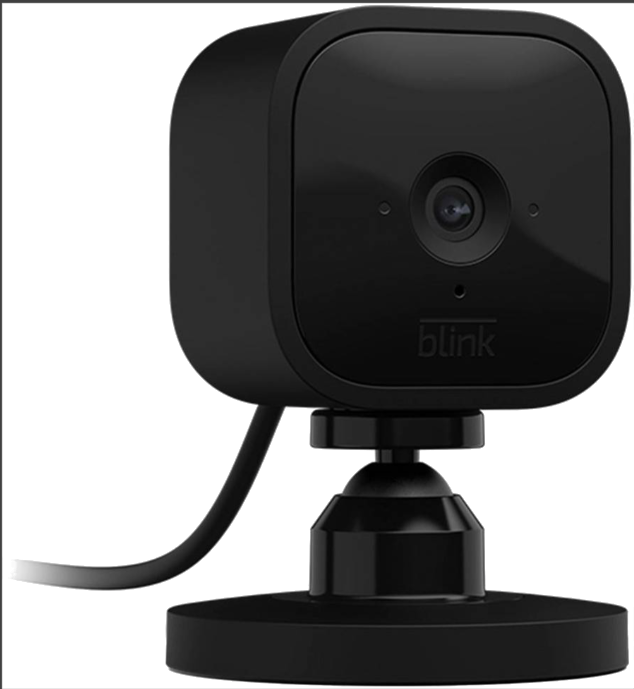
Blink Mini Review: The Compact Indoor Security Camera That Punches Above Its Weight
Finding an affordable indoor security camera that does not compromise on essential features can feel like searching for a needle in a haystack. The Blink Mini emerges as a compelling solution for homeowners who want reliable home monitoring without breaking the bank. This compact plug-in smart security camera from Amazon’s Blink brand delivers 1080p HD video, night vision, motion detection, and two-way audio in a package small enough to hide in plain sight. This comprehensive review examines whether the Blink Mini deserves its spot as one of Amazon’s best-selling security cameras and helps you determine if it fits your home security needs.
Introducing the Blink Mini Security Camera
The Blink Mini represents Amazon’s entry-level offering in the indoor security camera market, designed to provide essential surveillance capabilities at an accessible price point. Unlike battery-powered alternatives that require periodic charging, the Blink Mini operates through continuous plug-in power, ensuring uninterrupted monitoring of your home. This wired approach eliminates the anxiety of dead batteries during critical moments while simplifying the overall user experience.
The camera’s diminutive size sets it apart from bulkier competitors. Measuring just 1.97 inches square and 1.57 inches deep, the Blink Mini can sit unobtrusively on shelves, mount discreetly on walls, or tuck into corners without dominating your home’s aesthetic. The white finish blends naturally with most interior decor, while the included mounting kit provides flexibility in positioning. Despite its small stature, the Blink Mini incorporates a comprehensive feature set that rivals cameras costing significantly more.
1080p HD Video Quality and Performance
Video resolution matters significantly when identifying faces, reading text, or capturing important details during security events. The Blink Mini records in full 1080p high definition, providing sharp, clear footage that captures the fine details necessary for effective home monitoring. The 110-degree field of view offers a generous perspective, allowing a single camera to cover entire rooms or wide entryways without requiring multiple devices.
During daylight hours, the Blink Mini produces vibrant, well-balanced images with accurate color reproduction. The camera automatically adjusts exposure and white balance to handle varying lighting conditions, preventing washed-out highlights in sunny rooms or overly dark shadows in dimly lit spaces. The image sensor captures smooth video at standard frame rates, ensuring that motion appears natural rather than choppy or stuttering. This smooth motion capture proves essential when reviewing footage to identify how events unfolded.
Understanding the 110-Degree Field of View
The 110-degree viewing angle strikes an optimal balance between coverage area and detail capture. Wide-angle lenses exceeding 120 degrees can introduce noticeable distortion at the edges of the frame, making facial identification difficult near the periphery. Conversely, narrower angles might require additional cameras to cover the same space. The Blink Mini’s 110-degree perspective comfortably covers most rooms while maintaining image quality across the entire frame. When positioning the camera, consider placing it in a corner to maximize coverage of two walls simultaneously.
Night Vision Capabilities in Low Light
Effective night vision separates adequate security cameras from exceptional ones. The Blink Mini incorporates infrared LED technology that automatically activates when ambient light drops below detectable levels. This infrared illumination is invisible to the human eye, allowing the camera to capture clear black-and-white footage without alerting potential intruders that they are being recorded. The night vision range extends approximately 20 feet, sufficient for monitoring entryways, hallways, and standard-sized rooms.
The transition between day and night modes occurs seamlessly through an ambient light sensor that continuously monitors illumination levels. Users can disable the recording LED indicator through the Blink app settings, ensuring the camera operates covertly after dark. This stealth operation proves valuable when you want to observe activity without the camera’s presence being immediately obvious. The infrared LEDs provide even illumination across the viewing area, preventing the hot spots and dark corners common in inferior night vision systems.
Motion Detection and Smart Alerts
The Blink Mini employs pixel difference analysis technology to detect motion within its field of view. This system compares consecutive video frames and triggers alerts when significant changes occur. The motion detection range extends to approximately 20 feet, covering the practical monitoring distance for most indoor applications. When motion is detected, the camera records a clip and sends a notification to your smartphone through the Blink app, enabling immediate awareness of activity in your home.
Adjustable sensitivity settings allow customization of the motion detection response. Lower sensitivity reduces false alarms from minor movements like curtains shifting or pets moving, while higher sensitivity ensures capture of subtle activity. The Blink Mini also supports activity zones, which enable you to define specific areas within the camera view where motion should trigger alerts while ignoring activity in other regions. This zone customization proves particularly useful when the camera views areas with expected movement, such as pathways outside windows.
Setting Up Motion Detection Zones
Configuring activity zones in the Blink app involves selecting regions within the camera view where motion detection should be active or inactive. You might mask off a window that shows street traffic to prevent constant alerts from passing cars while maintaining detection coverage of the room interior. The app interface allows dragging rectangular zones to cover or exclude specific areas, providing granular control over what triggers notifications. Multiple zones can be created and customized independently, offering sophisticated monitoring tailored to your specific environment.
Two-Way Audio Communication Features
Beyond passive video recording, the Blink Mini enables interactive communication through built-in speaker and microphone components. Two-way audio allows you to listen to sounds in your home and speak through the camera remotely using the Blink app on your smartphone. This functionality transforms the security camera into a versatile communication device with multiple practical applications beyond basic surveillance.
Parents find two-way audio invaluable for checking on children or communicating with family members without being physically present. Pet owners use the feature to reassure anxious animals or deter unwanted behaviors when away from home. The communication capability also serves security purposes by allowing you to speak to anyone detected in your home, potentially startling intruders or communicating with delivery personnel. Audio quality supports clear conversations, with the speaker volume sufficient for typical room distances and the microphone capturing voices distinctly.
Blink App Integration and Remote Monitoring
The Blink app serves as the central hub for managing your Blink Mini camera, available for both iOS and Android devices at no additional cost. Through the app, you can view live video feeds, review recorded clips, adjust camera settings, and receive motion alerts from anywhere with internet connectivity. The interface prioritizes simplicity, making camera management accessible even for users unfamiliar with smart home technology.
Live view functionality streams real-time video from your camera to your smartphone, allowing immediate visual confirmation of your home’s status. The app supports multiple Blink cameras, enabling you to monitor different rooms or angles from a single interface. Clip history organizes recorded motion events chronologically, with thumbnails and timestamps making it easy to locate specific incidents. Playback controls allow pausing, rewinding, and fast-forwarding through recorded footage to find the moments that matter.
App Features and Navigation
The Blink app organizes functionality into intuitive sections accessible through a clean, uncluttered interface. The home screen displays all connected cameras with status indicators showing connectivity and battery levels for battery-powered models. Tapping a camera thumbnail opens the live view, while swiping reveals quick access to settings and clip history. Notification settings can be customized per camera, allowing different alert preferences for different monitoring locations. The app also provides access to Blink subscription plans and account management features.
Alexa Integration and Smart Home Compatibility
As an Amazon product, the Blink Mini integrates seamlessly with Alexa-enabled devices throughout your smart home ecosystem. Through Alexa, you can view live camera feeds on Echo Show devices, Fire TV, and Fire tablets using simple voice commands. Saying “Alexa, show me the living room camera” instantly displays the Blink Mini feed on compatible screens, eliminating the need to navigate through apps on your phone.
Alexa routines can incorporate Blink Mini functionality, enabling automated actions based on camera events. For example, you might create a routine that turns on smart lights when the camera detects motion, providing illumination when entering a dark room. The integration extends to Alexa’s Drop In feature on Echo devices, allowing two-way communication through the camera without opening the Blink app. These smart home connections enhance the Blink Mini’s utility beyond standalone security camera operation.
Setting Up Alexa Integration
Enabling Alexa control requires linking your Blink account through the Alexa app. Navigate to the Skills and Games section, search for Blink, and enable the skill. The app prompts you to sign in with your Blink credentials, after which your cameras appear as discoverable devices. Once linked, voice commands provide immediate access to live feeds on Echo Show and Fire TV devices. You can also include camera views in custom routines alongside other smart home actions.
Storage Options: Cloud vs Local
The Blink Mini offers flexible storage solutions to accommodate different preferences and budgets. Cloud storage through Blink Subscription Plans automatically uploads motion clips to secure servers, providing off-site backup and access from any device. The Blink Basic Plan covers a single camera and stores motion clips for up to 60 days, while the Blink Plus Plan supports unlimited cameras with extended storage. These subscription plans include additional features like person detection and extended live view sessions.
For users preferring local storage without subscription fees, the Blink Mini syncs with Blink Sync Module 2, which enables local clip storage on USB drives. This approach keeps your video data physically in your home while avoiding monthly costs. The Sync Module 2 connects to your WiFi network and serves as a hub for multiple Blink cameras, providing a centralized storage solution. Without either cloud subscription or Sync Module 2, the camera supports live viewing and motion alerts but does not store recorded clips.
Choosing the Right Storage Solution
Selecting between cloud and local storage depends on your priorities. Cloud storage offers convenience, automatic backup, and access from anywhere, but requires ongoing subscription fees. Local storage through Sync Module 2 provides one-time cost and complete data privacy, though clips remain accessible only when connected to your home network. Some users employ both methods, using local storage for routine recording while maintaining cloud backup for critical events. Consider your budget, technical comfort level, and how you intend to use recorded footage when making this decision.
Easy Setup and Installation Process
The Blink Mini emphasizes simplicity from unboxing to operation. The camera arrives with a USB power adapter, a USB cable, and a mounting kit including screws and a bracket. Setup begins by plugging the camera into a power outlet and downloading the Blink app to your smartphone. The app guides you through creating a Blink account, adding the camera to your system, and connecting it to your WiFi network.
The WiFi connection process uses a QR code displayed in the app that the camera scans to receive network credentials. This method eliminates manual password entry and reduces configuration errors. The entire setup typically completes within five minutes, with the camera ready for immediate use once connected. Physical mounting is optional, as the camera functions perfectly sitting on flat surfaces, though wall mounting provides better positioning options and theft deterrence.
WiFi Requirements and Connectivity
The Blink Mini requires a 2.4GHz WiFi network for operation, which is standard for most smart home devices. The camera does not support 5GHz networks, so ensure your router broadcasts a 2.4GHz signal or set up a dedicated IoT network on this frequency. Minimum internet upload speeds of 2 Mbps support standard video quality, though faster connections improve streaming performance. The camera maintains a stable connection at typical home distances from routers, with range extending through walls and floors typical of residential construction.
Compact Design and Placement Flexibility
The Blink Mini’s small form factor distinguishes it from competitors that demand significant shelf space or prominent wall mounting. Measuring less than two inches in each dimension, the camera disappears into home environments when positioned thoughtfully. The square design with rounded corners presents a modern aesthetic that does not look out of place among contemporary home electronics.
Placement options include freestanding positioning on shelves, tables, or window sills, as well as wall mounting using the included bracket. The camera’s lightweight construction allows mounting with simple screws on drywall or wood surfaces. The power cable provides approximately six feet of length from outlet to camera, accommodating various positioning scenarios. For longer distances, standard USB extension cables can increase reach without affecting performance.
Comparing Blink Mini to Competitors
The budget security camera market offers numerous alternatives to the Blink Mini, including offerings from Wyze, Ring, and TP-Link. The Wyze Cam v3 provides similar features with outdoor weatherproofing at a comparable price point. Ring’s Indoor Cam offers tighter integration with Ring security systems but at a higher cost. TP-Link’s Kasa cameras compete on price while offering different app experiences.
The Blink Mini’s advantages include its diminutive size, Alexa ecosystem integration, and the backing of Amazon’s customer service infrastructure. The free cloud storage trial allows testing before committing to subscription plans. Limitations include the lack of continuous recording, indoor-only use without additional weatherproofing, and dependence on cloud or Sync Module 2 for clip storage. For users already invested in Amazon’s smart home ecosystem, the Blink Mini provides seamless integration that competitors struggle to match.
Real-World Performance and User Experiences
Actual user experiences with the Blink Mini reflect generally positive satisfaction for its price category. Common praise includes the straightforward setup process, reliable motion detection, and compact form factor that fits discreetly into home environments. Users appreciate the free basic features that operate without subscription requirements and the responsive app interface.
Reported limitations focus on the 110-degree field of view, which some users find narrow compared to ultra-wide alternatives, and the requirement for subscriptions or Sync Module 2 for clip storage. Some users note occasional connectivity drops requiring app restarts, though these appear infrequent. The camera’s indoor-only rating disappoints users seeking weatherproof options, though Blink’s Outdoor cameras address this use case within the same ecosystem.
Ideal Use Cases for the Blink Mini
The Blink Mini excels in specific scenarios where its strengths align with user needs. Apartment dwellers appreciate the compact size and easy installation without permanent mounting requirements. Parents monitoring nurseries or playrooms value the two-way audio for quick check-ins. Pet owners use the camera to observe animal behavior and provide reassurance through the speaker. Renters benefit from the non-permanent setup that leaves no trace when moving.
The camera serves effectively as an entry-level security solution for single rooms, entryways, or small apartments where comprehensive coverage is not required. It functions as a supplementary camera in larger homes already equipped with primary security systems, adding coverage to specific areas like garages, workshops, or storage rooms. Budget-conscious users find the upfront cost manageable while subscription options allow scaling features as needs evolve.
Technical Specifications Summary
The Blink Mini delivers 1080p HD video resolution at 30 frames per second through a 110-degree field of view lens. Infrared LEDs provide night vision capabilities extending to approximately 20 feet. The camera measures 1.97 x 1.97 x 1.57 inches and weighs 1.7 ounces. Power requirements are 5V USB through the included adapter. Connectivity operates on 2.4GHz WiFi networks with WPA2 security. Operating temperature ranges from 32 to 95 degrees Fahrenheit. The camera integrates with iOS 11.0+ and Android 5.0+ devices through the Blink app and works with Amazon Alexa for voice control and smart home integration.
Pros and Cons Overview
The Blink Mini offers several compelling advantages including its compact size that fits anywhere, straightforward setup requiring no technical expertise, 1080p video quality with effective night vision, two-way audio for communication, Alexa integration for smart home users, and affordable entry price point. The free tier provides basic functionality without mandatory subscriptions, and Amazon’s customer support backs the product.
Considerations include the requirement for cloud subscription or Sync Module 2 for clip storage, 110-degree field of view that may require multiple cameras for large rooms, indoor-only use without weatherproofing, and dependence on 2.4GHz WiFi. The lack of continuous recording limits its use for always-on monitoring, and the small size makes it easier to steal if not mounted securely. These limitations are appropriate for the price point but worth considering against specific use cases.
Pricing and Value Assessment
The Blink Mini positions itself aggressively in the budget security camera segment, often selling at prices that undercut comparable competitors. Individual cameras typically cost less than dinner for two, making multiple-camera setups financially accessible. Periodic sales and multi-pack discounts further reduce per-camera costs for comprehensive home coverage.
Value assessment must include potential ongoing costs for cloud storage subscriptions. While the camera functions for live viewing without subscriptions, most users will want clip storage for security purposes. The Blink Basic Plan adds modest monthly cost for single-camera cloud storage, while the Sync Module 2 represents a one-time investment for local storage. Even with these additional costs, the total ownership expense remains competitive with alternatives offering fewer features.
Final Verdict: Who Should Buy the Blink Mini
The Blink Mini earns recommendation for first-time security camera buyers seeking affordable entry into home monitoring. Its combination of essential features, compact design, and integration with Amazon’s ecosystem creates compelling value. Users who prioritize simplicity over advanced capabilities will find the Blink Mini delivers everything needed for basic indoor surveillance without overwhelming complexity or cost.
The camera suits apartment dwellers, renters, and homeowners wanting supplementary coverage of specific areas. It functions as an accessible introduction to smart home security for technology newcomers while providing sufficient functionality for experienced users seeking simple solutions. For comprehensive whole-home coverage or outdoor monitoring, Blink’s other camera models or competing products might better serve those needs. However, as a starting point or targeted indoor solution, the Blink Mini represents excellent value and reliable performance.